Wednesday, November 3, 2010
Face Detection trials
Detecting head: while sift shows its robustness in scale and rotation, there is somewhat of an illumination problem
Clearer YOUTUBE videos
http://www.youtube.com/watch?v=mgr96oeXqH0
http://www.youtube.com/watch?v=lapux3e91_Y
http://www.youtube.com/watch?v=bMBNLPcLOVk

Matlab AVI video use
Matlab requires a RAW VIDEO file to be imported and used. however most cameras and recording devices use a compression to reduce file size and so on.
my trouble was an AVI file with a different codec. when i used AVIREAD in matlab, it gave me an error that it wasnt able to find the codedc or the frames are not known.
one option that is FREE:
use FFMPEG im downloading the executable for windows from this URL
ffmpeg is a command line tool, so in order to convert to a raw video to use in maatlab you use this command:
foo.avi is your compressed video file
bar.avi is your new raw video file name that you will use in MATLAB
my trouble was an AVI file with a different codec. when i used AVIREAD in matlab, it gave me an error that it wasnt able to find the codedc or the frames are not known.
one option that is FREE:
use FFMPEG im downloading the executable for windows from this URL
ffmpeg is a command line tool, so in order to convert to a raw video to use in maatlab you use this command:
c:/> ffmpeg -i foo.avi -vcodec rawvideo bar.avi
foo.avi is your compressed video file
bar.avi is your new raw video file name that you will use in MATLAB
Wednesday, October 27, 2010
SIFT keypoint matching Trials of my Implementation


 for my second experiment i tried translation invariance, 2 images taken from different angles. i got 243 matches
 In my next experiment i tried a complete affine transformation of a graffiti wall, i got 22 matches but not so accurate. this shows the keypoints have a problem in its rotation and scaling invariants. my magnitude and teta maybe the cause of this.
 This is a matching from David Lowes algorithm showing a clear affine invariance.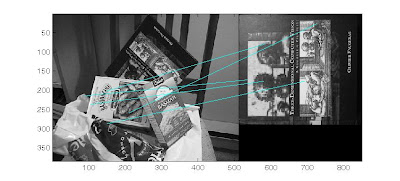
my implementation gives me a very bad matching. alot more work to do.
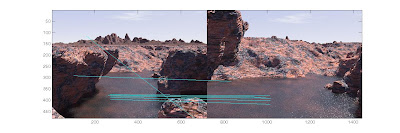
and more bad results, if the orientation of the keypoint is wrong, the matching will also suffer so i tired different tangents in matlab
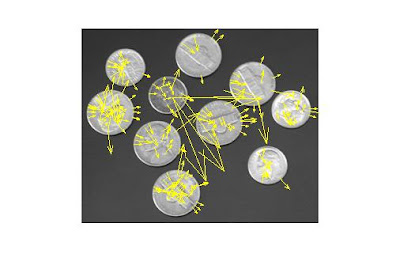
atan(dy/dx);
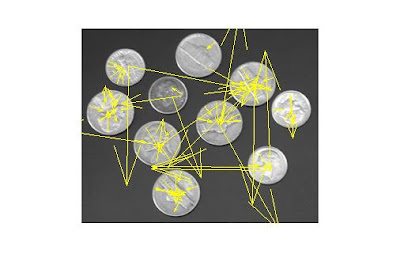
 atan2(dy,dx);
BOTH IMAGES: show clearly that rotation invariance is not achieved, this is the reason why the matching gives alot of false negative results
furthermore; the amount of BLUR is also very important
 images and details from (based on my understanding):
Lowe, David G. “Distinctive Image Features from Scale Invariant Keypoints”. International Journal of Computer Vision, 60, 2 (2004)
Monday, October 25, 2010
My SIFT implementation and comparisons
Im trying to implement SIFT in matlab and compare it with other implementations
the comparisons are against the following:
original SIFT code by LOWE found at this URL
the other is the popular A. Vedaldi Code found at this URL

This is the result of the vadaldi code that finds 262 key points

This is the original SIFT code by David Lowe showing 249 keypoints


This is from my code showing 315 keypoints.
from all 3 images you can see that there are points that are outside of the image and a surprising 70 extra keypoints on my implementation. obviously my implementation is wrong, so i tried to go through the code and adjusted a few things
 Now i get 195 keypoints and as you can see from the image, all the keypoints are located inside of the image. my next problem is the magnitude.
from the previous images, the code from LOWE and VEDALDI have a very good magnitude however my implementation has very small.


All yellow markers are from my implementation
Thursday, October 21, 2010
Computer vision Datasets to use
a very nice dataset collected by Krystian Mikolajczyk for testing scaled and affine interest point detectors with various types of local image descriptors.
These are some of the other dataset that i use:
MIT Face Dataset
MIT Car Datasets
MIT Street Scenes
Pedestrian dataset from MIT
Most of the files are in *.ppm format, i personally use adobe photoshop to open these
These are some of the other dataset that i use:
MIT Face Dataset
MIT Car Datasets
MIT Street Scenes
Pedestrian dataset from MIT
Most of the files are in *.ppm format, i personally use adobe photoshop to open these
Thursday, September 30, 2010
background subtraction (problems)
there are several problems that must
be addressed by a good background removal algorithm to
correctly detect moving objects. A good background removal
algorithm should handle the relocation of background objects,
non-stationary background objects e.g. waving trees,
and image changes due to camera motion which is common
in outdoor applications e.g. wind load. A background removal
system should adapt to illumination changes whether
gradual changes (time of day) or sudden changes (lightswitch),
whether global or local changes such as shadows and interreflections.
A foreground object might have similar characteristics
as the background, it become difficult to distinguish
between them (camouflage). A foreground object that becomes
motionless can not be distinguished from a background
object that moves and then becomes motionless
(sleeping person). A common problem faced in the background
initialization phase is the existence of foreground
objects in the training period, which occlude the actual background,
and on the other hand often it is impossible to clear
an area to get a clear view of the background, this puts serious
limitations on system to be used in high traffic areas.
Some of these problems can be handled by very computationally
expensive methods, but in many applications, a short
processing time is required.
for a few see the following: POST1 - POST2 - POST3
be addressed by a good background removal algorithm to
correctly detect moving objects. A good background removal
algorithm should handle the relocation of background objects,
non-stationary background objects e.g. waving trees,
and image changes due to camera motion which is common
in outdoor applications e.g. wind load. A background removal
system should adapt to illumination changes whether
gradual changes (time of day) or sudden changes (lightswitch),
whether global or local changes such as shadows and interreflections.
A foreground object might have similar characteristics
as the background, it become difficult to distinguish
between them (camouflage). A foreground object that becomes
motionless can not be distinguished from a background
object that moves and then becomes motionless
(sleeping person). A common problem faced in the background
initialization phase is the existence of foreground
objects in the training period, which occlude the actual background,
and on the other hand often it is impossible to clear
an area to get a clear view of the background, this puts serious
limitations on system to be used in high traffic areas.
Some of these problems can be handled by very computationally
expensive methods, but in many applications, a short
processing time is required.
for a few see the following: POST1 - POST2 - POST3
Image Filtering (Gaussian)
A filter is any kind of processing that has one characteristic: it takes a signal as the input and produces a relevant output signal after processing it in some way. A filter can always be mathematically described.
In Matlab:
n represents the number of cells so for a 2D 3x3 filter n=9 for a 1D filter the number of cells in my example above is 7
% 2D Gaussian Filter
x = -1/2:1/(n-1):1/2;
[Y,X] = meshgrid(x,x);
f = exp( -(X.ˆ2+Y.ˆ2)/(2*sˆ2) );
f = f / sum(f(:));
%1D Gaussian Filter
x = -1/2:1/(n-1):1/2;
f = exp( -(x.^2)/(2*sigma^2) );
g = f / sum(sum(f));
An example of a 1D filter:
1 2 3 4 3 2 1
An example of a 2D filter:
1 1 1 1 1
1 2 2 2 1
1 2 3 2 1
1 2 2 2 1
1 1 1 1 1
In Matlab:
n represents the number of cells so for a 2D 3x3 filter n=9 for a 1D filter the number of cells in my example above is 7
% 2D Gaussian Filter
x = -1/2:1/(n-1):1/2;
[Y,X] = meshgrid(x,x);
f = exp( -(X.ˆ2+Y.ˆ2)/(2*sˆ2) );
f = f / sum(f(:));
%1D Gaussian Filter
x = -1/2:1/(n-1):1/2;
f = exp( -(x.^2)/(2*sigma^2) );
g = f / sum(sum(f));
Subscribe to:
Posts (Atom)