Showing posts with label Scale-invariant feature transform. Show all posts

Wednesday, October 27, 2010

SIFT keypoint matching Trials of my Implementation


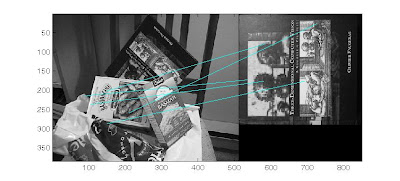
2 of the same images, using my own SIFT implementation gives me 722 matches
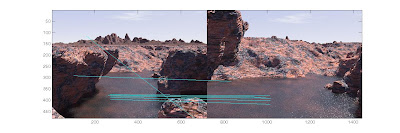
for my second experiment i tried translation invariance, 2 images taken from different angles. i got 243 matches
In my next experiment i tried a complete affine transformation of a graffiti wall, i got 22 matches but not so accurate. this shows the keypoints have a problem in its rotation and scaling invariants. my magnitude and teta maybe the cause of this.
This is a matching from David Lowes algorithm showing a clear affine invariance.


my implementation gives me a very bad matching. alot more work to do.


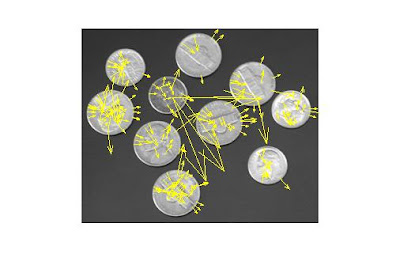
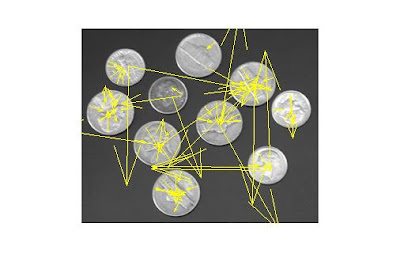
and more bad results, if the orientation of the keypoint is wrong, the matching will also suffer so i tired different tangents in matlab
atan(dy/dx);
atan2(dy,dx);

BOTH IMAGES: show clearly that rotation invariance is not achieved, this is the reason why the matching gives alot of false negative results

furthermore; the amount of BLUR is also very important
images and details from (based on my understanding):
Lowe, David G. “Distinctive Image Features from Scale­ Invariant Keypoints”. International Journal of Computer Vision, 60, 2 (2004)

Saturday, September 25, 2010

SIFT tracking set1


Video: Result of identification for tracking


the objective is to find an object in the foreground place a rectangle around the object and find SIFT keypoints in that rectangle, for the next frames only match those keypoints from the rectangle to the image

images and details from (based on my understanding):
Lowe, David G. “Distinctive Image Features from Scale­ Invariant Keypoints”. International Journal of Computer Vision, 60, 2 (2004)

The STEPS:
  1. go through all the video and find SIFT keypoints in each frame
  2. from an initial frame, select a moving object or foreground and place a rectangle around it
  3. get all the SIFT keypoints in that rectangle
  4. match the points from that rectangle to all the other points found in step 1
  5. if match is found place a rectangle in succeeding frames

problem: in some frames keypoints dont match,thats the reason why i loose track of the vehicle
its either there arent enough matches or those keypoints are different from the first frame
again i consider the keypoints found only in the first frame and compare to new frames

TO DO: compare points from first frame to the next.if object found get the new SIFT points of that object from the new frame and then compare to succeeding frame.

objective: track using SIFT points without needed to preselect the cars

code:

img = imread([imgDir '\' fileNames(3).name]);
[r c bands] = size(img);
h=figure;
imshow(img);
hold on;

....

title('Click the top left corner of an object to track...');
[x1 y1] = ginput(1);
plot(x1, y1, 'rx');
title(sprintf('Click the bottom right corner (Right click indicates last object)'));
[x2 y2 button] = ginput(1);
objectCount = objectCount+1;
rectangle('Position', [x1 y1 x2-x1 y2-y1], 'LineWidth', 4, 'EdgeColor', colors(mod(objectCount, size(colors,1))+1, :));

.....

% Find the sift features for the object
imwrite(trackingObjects{objectCount}.img, 'tmp.pgm', 'pgm');
[jnk des locs] = sift('tmp.pgm');
trackingObjects{objectCount}.des = des;

....

% Read in the next image
img = imread([imgDir '\' fileNames(ii).name]);

% Show the image
figure(h)
cla;
imshow(img); hold on;

% Look for features in the image for each object we are tracking

.....

% Match the features for this object
clear match;
match = matchFeatures(trackingObjects{jj}.des, des);
clear newLocs
newLocs = locs(match(match>0), :);

% Only proceed if we found at least one match
if ~isempty(newLocs)
print('match ound');
....

Tuesday, September 21, 2010

SIFT by lowe using ImageJ (PARTIAL)

create a a plain text file and place the code in it.
from within ImageJ, open any image
From the ImageJ menu select PLUGINS -> MACRO's -> RUN

results show the first 2 steps of SIFT, however the 3 step takes alot of time to process because we are going through each pixel and thats done for all 4 octaves.

for short overview of SIFT please see my post HERE


//*************************************************

// SIFT Step 1: Constructing a scale space

//*************************************************
//Lowe claims blur the image with a sigma of 0.5 and double it's dimensions

width=getWidth(); height=getHeight();

//------------------------------------------------------------------------
// convert to 8-bit gray scale and create scale space for the first octave
//------------------------------------------------------------------------

run("Duplicate...", "title=[Copy of original]");
Oid = getImageID;
run("8-bit");

run("Duplicate...", "title=[Octave 1 blur1]");
P1id1 = getImageID;
run("Gaussian Blur...", "slice radius=2"); //blur 1

run("Duplicate...", "title=[Octave 1 blur 2]");
P1id2 = getImageID;
run("Gaussian Blur...", "slice radius=4"); //blur 2

run("Duplicate...", "title=[Octave 1 blur 3]");
P1id3 = getImageID;
run("Gaussian Blur...", "slice radius=8"); //blur 3

run("Duplicate...", "title=[Octave 1 blur 4]");
P1id4 = getImageID;
run("Gaussian Blur...", "slice radius=16"); //blur 4

run("Duplicate...", "title=[Octave 1 blur 5]");
P1id5 = getImageID;
run("Gaussian Blur...", "slice radius=16"); //blur 5
showMessage("DONE", "First OCTAVE");
//----------------------------------------------------------------------------
// Perform image resize on original and create second octave
//----------------------------------------------------------------------------

selectImage(Oid);
run("Size...", "width="+width/2+" height="+ height/2);
run("Duplicate...", "title=[Octave 2 blur1]"); P2id1 = getImageID; run("Gaussian Blur...", "slice radius=2"); //blur 1
run("Duplicate...", "title=[Octave 2 blur 2]"); P2id2 = getImageID; run("Gaussian Blur...", "slice radius=4"); //blur 2
run("Duplicate...", "title=[Octave 2 blur 3]"); P2id3 = getImageID; run("Gaussian Blur...", "slice radius=8"); //blur 3
run("Duplicate...", "title=[Octave 2 blur 4]"); P2id4 = getImageID; run("Gaussian Blur...", "slice radius=16"); //blur 4
run("Duplicate...", "title=[Octave 2 blur 5]"); P2id5 = getImageID; run("Gaussian Blur...", "slice radius=16"); //blur 5

showMessage("DONE", "Second OCTAVE");

//----------------------------------------------------------------------------
// Perform image resize on original and create Third octave
//----------------------------------------------------------------------------

selectImage(Oid);
run("Size...", "width="+width/4+" height="+ height/4);
run("Duplicate...", "title=[Octave 3 blur1]"); P3id1 = getImageID; run("Gaussian Blur...", "slice radius=2"); //blur 1
run("Duplicate...", "title=[Octave 3 blur 2]"); P3id2 = getImageID; run("Gaussian Blur...", "slice radius=4"); //blur 2
run("Duplicate...", "title=[Octave 3 blur 3]"); P3id3 = getImageID; run("Gaussian Blur...", "slice radius=8"); //blur 3
run("Duplicate...", "title=[Octave 3 blur 4]"); P3id4 = getImageID; run("Gaussian Blur...", "slice radius=16"); //blur 4
run("Duplicate...", "title=[Octave 3 blur 5]"); P3id5 = getImageID; run("Gaussian Blur...", "slice radius=16"); //blur 5
showMessage("DONE", "Third OCTAVE");

//------------------------------------------------------------------------------
// Perform image resize on original and create Forth octave
//------------------------------------------------------------------------------

selectImage(Oid);
run("Size...", "width="+width/8+" height="+ height/8);

run("Duplicate...", "title=[Octave 4 blur1]"); P4id1 = getImageID; run("Gaussian Blur...", "slice radius=2"); //blur 1
run("Duplicate...", "title=[Octave 4 blur 2]"); P4id2 = getImageID; run("Gaussian Blur...", "slice radius=4"); //blur 2
run("Duplicate...", "title=[Octave 4 blur 3]"); P4id3 = getImageID; run("Gaussian Blur...", "slice radius=8"); //blur 3
run("Duplicate...", "title=[Octave 4 blur 4]"); P4id4 = getImageID; run("Gaussian Blur...", "slice radius=16"); //blur 4
run("Duplicate...", "title=[Octave 4 blur 5]"); P4id5 = getImageID; run("Gaussian Blur...", "slice radius=16"); //blur 5

showMessage("DONE", "Forth OCTAVE");

//**********************************************************
// SIFT Step 2: Laplacian of Gaussian Approximation
//**********************************************************

// input is 5 blurred images per octave
// output is 4 images per octave

imageCalculator('subtract', P1id1, P1id2); Q1I1 = getImageID; rename("Result Subtract Octave 1");
imageCalculator('subtract', P1id2, P1id3); Q1I2 = getImageID; rename("Result Subtract Octave 1");
imageCalculator('subtract', P1id3, P1id4); Q1I3 = getImageID; rename("Result Subtract Octave 1");
imageCalculator('subtract', P1id4, P1id5); Q1I4 = getImageID; rename("Result Subtract Octave 1");

imageCalculator('subtract', P2id1, P2id2); Q2I1 = getImageID; rename("Result Subtract Octave 2");
imageCalculator('subtract', P2id2, P2id3); Q2I2 = getImageID; rename("Result Subtract Octave 2");
imageCalculator('subtract', P2id3, P2id4); Q2I3 = getImageID; rename("Result Subtract Octave 2");
imageCalculator('subtract', P2id4, P2id5); Q2I4 = getImageID; rename("Result Subtract Octave 2");

imageCalculator('subtract', P3id1, P3id2); Q3I1 = getImageID; rename("Result Subtract Octave 3");
imageCalculator('subtract', P3id2, P3id3); Q3I2 = getImageID; rename("Result Subtract Octave 3");
imageCalculator('subtract', P3id3, P3id4); Q3I3 = getImageID; rename("Result Subtract Octave 3");
imageCalculator('subtract', P3id4, P3id5); Q3I4 = getImageID; rename("Result Subtract Octave 3");

imageCalculator('subtract', P3id1, P3id2); Q4I1 = getImageID; rename("Result Subtract Octave 4");
imageCalculator('subtract', P3id2, P3id3); Q4I2 = getImageID; rename("Result Subtract Octave 4");
imageCalculator('subtract', P3id3, P3id4); Q4I3 = getImageID; rename("Result Subtract Octave 4");
imageCalculator('subtract', P3id4, P3id5); Q4I4 = getImageID; rename("Result Subtract Octave 4");

//************************************************************
// SIFT Step 3: Finding key points
//************************************************************

//need to generate 2 extrema images
// maxima and minima almost never lies exactly on a pixel. since its between pixels we need to locate it mathematically using Tylor expansion


//--------------------------------------------------------------------------------
// first octave
//--------------------------------------------------------------------------------


/*
selectImage(Q1I2);
width=getWidth(); height=getHeight();

num = 0; //number of points
numRemoved = 0; //failed tested points

for (xi=1; xi<width; xi++)
{
for(yi=1; yi<height; yi++)
{
justSet = 1;
currentPixel = getPixel(xi, yi);

if ( (currentPixel > getPixel(yi+1, xi)) &
(currentPixel > getPixel(yi+1, xi) ) &
(currentPixel > getPixel(yi, xi-1) ) &
(currentPixel > getPixel(yi, xi+1)) &
(currentPixel > getPixel(yi-1, xi-1) ) &
(currentPixel > getPixel(yi-1, xi+1) ) &
(currentPixel > getPixel(yi+1, xi+1) ) &
(currentPixel > getPixel(yi+1, xi-1)) )
{

selectImage(Q1I1);
if ( (currentPixel > getPixel(yi+1, xi)) &
(currentPixel > getPixel(yi+1, xi) ) &
(currentPixel > getPixel(yi, xi-1) ) &
(currentPixel > getPixel(yi, xi+1)) &
(currentPixel > getPixel(yi-1, xi-1) ) &
(currentPixel > getPixel(yi-1, xi+1) ) &
(currentPixel > getPixel(yi+1, xi+1) ) &
(currentPixel > getPixel(yi+1, xi-1)) )

{
selectImage(Q1I3);
if ( (currentPixel > getPixel(yi+1, xi)) &
(currentPixel > getPixel(yi+1, xi) ) &
(currentPixel > getPixel(yi, xi-1) ) &
(currentPixel > getPixel(yi, xi+1)) &
(currentPixel > getPixel(yi-1, xi-1) ) &
(currentPixel > getPixel(yi-1, xi+1) ) &
(currentPixel > getPixel(yi+1, xi+1) ) &
(currentPixel > getPixel(yi+1, xi-1)) )

{
num++;
}
}

}
}
}
print("first part= " + num);

selectImage(Q1I3);
width=getWidth(); height=getHeight();
for (xi=1; xi<width; xi++)
{
for(yi=1; yi<height; yi++)
{
justSet = 1;
currentPixel = getPixel(xi, yi);

if ( (currentPixel > getPixel(yi+1, xi)) &
(currentPixel > getPixel(yi+1, xi) ) &
(currentPixel > getPixel(yi, xi-1) ) &
(currentPixel > getPixel(yi, xi+1)) &
(currentPixel > getPixel(yi-1, xi-1) ) &
(currentPixel > getPixel(yi-1, xi+1) ) &
(currentPixel > getPixel(yi+1, xi+1) ) &
(currentPixel > getPixel(yi+1, xi-1)) )
{

selectImage(Q1I2);
if ( (currentPixel > getPixel(yi+1, xi)) &
(currentPixel > getPixel(yi+1, xi) ) &
(currentPixel > getPixel(yi, xi-1) ) &
(currentPixel > getPixel(yi, xi+1)) &
(currentPixel > getPixel(yi-1, xi-1) ) &
(currentPixel > getPixel(yi-1, xi+1) ) &
(currentPixel > getPixel(yi+1, xi+1) ) &
(currentPixel > getPixel(yi+1, xi-1)) )

{

selectImage(Q1I4);
if ( (currentPixel > getPixel(yi+1, xi)) &
(currentPixel > getPixel(yi+1, xi) ) &
(currentPixel > getPixel(yi, xi-1) ) &
(currentPixel > getPixel(yi, xi+1)) &
(currentPixel > getPixel(yi-1, xi-1) ) &
(currentPixel > getPixel(yi-1, xi+1) ) &
(currentPixel > getPixel(yi+1, xi+1) ) &
(currentPixel > getPixel(yi+1, xi-1)) )

{

num++;

}
}

}
}
}
print("second part= "+num);

*/


//+++++++++++++++++++++++++++++++++++++++++++
// process takes too long... alternative MY IDEA

//+++++++++++++++++++++++++++++++++++++++++++

Randomly select points and compare it to a threshold if its maximum or minimum to the 26 neighbors then consider that point to be on a blob based on:

T. Lindeberg. Scale-Space Theory in Computer Vision.
Kluwer Academic Publishers, Norwell, MA, USA, 1994.
Quote: "local extrema points are located in a blob region"

So instead of going through each pixel of the image in multiple scales: select a specific number of random points and compare with the 26 neighbors. if you get a specific number of points that are maximum of minimum then continue to the next step if not get another set of random points until your specific number of maximum and minimum points are found.


CODE TO FOLLOW


Monday, April 26, 2010

IMAGE WARPING and MOSAICING

the process of combining multiple photographic images with overlapping fields of view to produce a segmented panorama or high-resolution image. Commonly performed through the use of computer software, most approaches to image stitching require nearly exact overlaps between images and identical exposures to produce seamless results.

My Steps
  1. Convert the video into Frames and then into Images
  2. using SIFT get pairs of corresponding points taken from the two images
  3. Recover homographies of each Image
  4. Warp the images using the homography
  5. Blend images into a mosaic using weighted average
  6. View the Results
a One minute video is 60*30 = 1800 images. Will reduce for speed.

function [mos_img]=mosaic(filename)
% creates a mosaic image from a movie
% assuming translation only between frames


warning off MATLAB:mir_warning_variable_used_as_function;

% using global names to cache frames in memory
% performance boosting
global Nframes;
global AviName;

AviName = filename;
[h, w, Nframes] = avi_size(AviName);

% relative displacements
d = zeros(2,Nframes);

RefFrame = GetImage(1);

% align every two consequent frames
for ii=2:Nframes

    % read a frame
    Frame = GetImage(ii);

    d(:,ii) = align(RefFrame, Frame, d(:,ii-1));

    % current frame is next one's reference
    RefFrame = Frame;
end

% cumulative displacement relative to first frame
D = cumsum(d,2);

% minimal
Minimum = min(D,[],2);
%maximal
Maximum = max(D,[],2);

% minimal displacement is one
D = D - Minimum*ones(1,Nframes)+1;

% create an empty mosaic (compute the bounding box)
mos_img = zeros([w, h]+ceil(Maximum'-Minimum'))';
[bm bn] = size(mos_img);
% creates weights
weights = zeros(bm,bn);

% shfoch everything into the mosaic
for ii=1:Nframes
    % read a frame
    Frame = GetImage(ii);

    tmpF(1:(h+1),1:(w+1)) = 0;
    tmpF(2:h+1,2:w+1) = Frame;
    intD = floor(D(:,ii));
    wF = warp(tmpF, (D(:,ii)-intD));
    wF(find(isnan(wF))) = 0;

    % mask
    m = zeros(size(tmpF));
    m(2:h+1,2:w+1) = 1;
    wm = warp(m, (D(:,ii)-intD));
    wm(find(isnan(wm))) = 0;

    [A B] = GetPosArray(bm, h, bn, w, intD);
    mos_img(A, B) = mos_img(A, B) + wF;
    weights(A, B) = weights(A, B) + wm;

end

weights = weights + (weights == 0); % in order to avoid zero division
mos_img = mos_img./weights;


function [A, B] = GetPosArray(bm, h, bn, w, intD)
% Gets an array, where to put the image.
% bm, bn - the total image's size
% h, w - single frame's size
% intD - the integer displacement.
A = bm - h + 1 - intD(2): bm - intD(2) + 1;
B = bn - w + 1- intD(1): bn - intD(1) + 1;


function image = GetImage(index)
% Gets the image data in the correct form (Double, greyscale).
% using chached frames to boost performance

% caching BUFFER_SIZE images at each access to the avi file
BUFFER_SIZE = 40;
persistent CurrentBlock M;
global AviName Nframes;

if (isempty(CurrentBlock))
    CurrentBlock = -1;
end;

% zindex to start from zero rather than one.
zindex = index - 1;

if (floor(zindex / BUFFER_SIZE) ~= CurrentBlock)
    CurrentBlock = zindex / BUFFER_SIZE;
    ReadTo = min((CurrentBlock+1)*BUFFER_SIZE, Nframes);
    M = aviread(AviName, (CurrentBlock*BUFFER_SIZE + 1):ReadTo);
end

localIndex = mod(zindex, BUFFER_SIZE) + 1;

%returning the right image in the correct format.
image = im2double(rgb2gray(M(localIndex).cdata ));


function [shift] = align(im1, im2, initial_shift)
% This function aligns im2 to im1 assuming an homography consist of shift only
% Input parameters
%   im1, im2 - images in double representation grey level range [0,1]
%
% The output parameters:
%   shift - a vector [dx, dy]' of displacement


% initial guess for displacement
shift = [0, 0]';
if (nargin == 3)
    shift = initial_shift;
end;

% global parameters
ITER_EPS = 0.001;
PYRAMID_DEPTH = 5;
ITERATIONS_PER_LEVEL = 5;
FILTER_PARAM = 0.4;         % parameter for gaussian pyramid

% Creating pyramids for both images.
F = gaussian_pyramid(im1, PYRAMID_DEPTH, FILTER_PARAM);
G = gaussian_pyramid(im2, PYRAMID_DEPTH, FILTER_PARAM);

% Allowing initial shift - scale it to fit pyramid level
shift = shift ./ (2^(PYRAMID_DEPTH+1));

% work coarse to fine in pyramids
for ii = PYRAMID_DEPTH : -1 : 1 %PYRAMID_DEPTH
    clear warped_im2;    % we are about to change its dimensionality

    shift = 2 * shift;   % compensate the scale factor between pyramid levels.

    % compute the gradient once per pyramid level
    [Fx Fy] = gradient(F{ii});

    % although we can re-calculate it according to overlapping zone
    % it is negligible thus we save computation by doing it once per level
    tmp = sum(Fx(:).*Fy(:));
    A = inv( [ sum(Fx(:).^2) tmp ; tmp sum(Fy(:).^2) ] );

    % iterate per pyramid level
    for jj = 1 : ITERATIONS_PER_LEVEL
        % always warp original image by accumulated shift, avoid over
        % blurring
        warped_im2 = warp(G{ii}, shift);

        % mask to rule out boundary (NaN values)
        mask = isnan(warped_im2);
        warped_im2(find(mask)) = 0;
        mask = 1-mask;

        % difference image - ignore parts that are not overlapping
        diff = ( F{ii}(:)-warped_im2(:) ).*mask(:);

        % Solve and update shift;
        tmpshift =  A*[sum(diff.*Fx(:)) ; sum(diff.*Fy(:))] ;
        shift = shift + tmpshift;
        if (abs(tmpshift) < ITER_EPS)
            break;
        end;
    end;
end;

% wrapping an image with shift using bilinear interpolation
function [warped] = warp(image, shift)
[x y] = size(image);
[X Y] = meshgrid(1:y,1:x); % Behold!!!
warped = interp2(image, X+shift(1), Y+shift(2), 'linear');


function [G] = gaussian_pyramid(image, n, a)
% compute n gaussian pyramid of an image
% a - filter parameter

G = cell(n,1);
G{1} = image;
for ii=1:n-1
    % use tmp variable to comply with varying size of image through down sampling
    G{ii+1}=gaussian_pyramid_one_stage(G{ii}, a);
end


function [G]=gaussian_pyramid_one_stage(im, a)
% compute one stage of a gaussian pyramid of an image
% a is the filter parameter

[m n]=size(im);

% construct the filter
filterKernel = [0.25 - (a/2), 0.25, a, 0.25, 0.25-(a/2)];
h = filterKernel'*filterKernel;

% filter the image, i.e. blur it with the gaussian, replicate to overcome
% boundary conditions
filt = imfilter(im, h, 'replicate');

% down sample
G = filt(1:2:m,1:2:n);

Wednesday, April 21, 2010

Video stabilization - using sift


first video shows Original video with Unwanted camera shake
second video shows result of video without camera shake


Buit in matlab function:
CP2TFORM Infer spatial transformation from control point pairs.
CP2TFORM takes pairs of control points and uses them to infer a
spatial transformation.


CP2TFORM requires a minimum number of control point pairs to infer a
% TFORM structure of each TRANSFORMTYPE:
%
% TRANSFORMTYPE MINIMUM NUMBER OF PAIRS
% ------------- -----------------------
% 'nonreflective similarity' 2
% 'similarity' 3
% 'affine' 3
% 'projective' 4


http://www.mathworks.com/access/helpdesk/help/toolbox/images/cp2tform.html

given a set of points "inp" in the first image
another set of points "outp" in another image
recompute the change in the projected points

Code:

% compute the similarity transformation
tt = cp2tform(inp, outp, 'linear conformal');
L = tt.tdata.T;
scale = sqrt(L(1,1)^2 + L(1,2)^2);
L(:,1:2) = L(:,1:2)/scale;
% sum the transforms up
T = T + L;
end

% get the average transformation
T = T/count;

% warping by backprojection.
% inv(T) is the transform from target back to the original image
T = inv(T);

width = size(im, 2);
height = size(im, 1);
% x and y are coordinates on the warped image
[x,y] = meshgrid(1:width, 1:height);
nxy = [x(:), y(:), ones(length(x(:)), 1)] * T;
% newx and newx are corresponding point coordinates in the original image
newx = reshape(nxy(:,1), height, width);
newy = reshape(nxy(:,2), height, width);

Math:

For an ‘affine’ transformation, the parametric motion can be described by the following formulas:

u(x,y) = a1x + a2y + a3
v(x,y) = a4x + a5y + a6

In this case there are six unknowns namely a1 –> a6 . In order to solve for these unknowns we must expand matrices to this form:


Since u1 –> u3 and v1 –> v3 can be easily calculated using the 3 pairs of points from each image and (x1 –> x3 , y1 –> y3) are already known, a1 –> a6 can be solved by using the formula v = (AT*A)-1 * AT b where (AT*A)-1 is defined as the pseudo inverse of A. With these new values imtransform() can modify the first image to correspond with the second image. xdata and ydata are variables describing the offset between the static image and transformed image, while trans is the scaled and sheared transformed image.


For a projective transformation: [up vp wp] = [x y w] T, where

u = up / wp
v = vp / wp.


T is a 3-by-3 matrix, where all nine elements can be different.

T = [ A D G
B E H
C F I]


The above matrix equation is equivalent to these two expressions:

u = (Ax + By + C) / (Gx + Hy + 1)
v = (Dx + Ey + F) / (Gx + Hy + 1)

Summary:

For a projective transformation:

u = (Ax + By + C)/(Gx + Hy + I)
v = (Dx + Ey + F)/(Gx + Hy + I)

Assume I = 1, multiply both equations, by denominator:

u = [x y 1 0 0 0 -ux -uy] * [A B C D E F G H]'
v = [0 0 0 x y 1 -vx -vy] * [A B C D E F G H]'

With 4 or more correspondence points we can combine the u equations and
the v equations for one linear system to solve for [A B C D E F G H]:

[ u1 ] = [ x1 y1 1 0 0 0 -u1*x1 -u1*y1 ] * [A]
[ u2 ] = [ x2 y2 1 0 0 0 -u2*x2 -u2*y2 ] [B]
[ u3 ] = [ x3 y3 1 0 0 0 -u3*x3 -u3*y3 ] [C]
[ u1 ] = [ x4 y4 1 0 0 0 -u4*x4 -u4*y4 ] [D]
[ ... ] [ ... ] [E]
[ un ] = [ xn yn 1 0 0 0 -un*xn -un*yn ] [F]
[ v1 ] = [ 0 0 0 x1 y1 1 -v1*x1 -v1*y1 ] [G]
[ v2 ] = [ 0 0 0 x2 y2 1 -v2*x2 -v2*y2 ] [H]
[ v3 ] = [ 0 0 0 x3 y3 1 -v3*x3 -v3*y3 ]
[ v4 ] = [ 0 0 0 x4 y4 1 -v4*x4 -v4*y4 ]
[ ... ] [ ... ]
[ vn ] = [ 0 0 0 xn yn 1 -vn*xn -vn*yn ]

Or rewriting the above matrix equation:
U = X * Tvec, where Tvec = [A B C D E F G H]'
so Tvec = X\U.

Saturday, April 17, 2010

2D homography using SIFT features

Finding Global motion estimation for 2 images.
Using SIFT, Much more point correspondences. Faster than RANSAC. can be used in real time videos.

Sift Code used is from Lowe's implementation.
Source: http://www.cs.ubc.ca/~lowe/keypoints/

TO DO:
use Video Clip for Matches

Pure Matlab Code:

function num = match(image1, image2)

% Find SIFT keypoints for each image
[im1, des1, loc1] = sift(image1);
[im2, des2, loc2] = sift(image2);

% For efficiency in Matlab, it is cheaper to compute dot products between
% unit vectors rather than Euclidean distances. Note that the ratio of
% angles (acos of dot products of unit vectors) is a close approximation
% to the ratio of Euclidean distances for small angles.
%
% distRatio: Only keep matches in which the ratio of vector angles from the
% nearest to second nearest neighbor is less than distRatio.
distRatio = 0.6;

% For each descriptor in the first image, select its match to second image.
des2t = des2'; % Precompute matrix transpose
for i = 1 : size(des1,1)
dotprods = des1(i,:) * des2t; % Computes vector of dot products
[vals,indx] = sort(acos(dotprods)); % Take inverse cosine and sort results

% Check if nearest neighbor has angle less than distRatio times 2nd.
if (vals(1) < im3 =" appendimages(im1,im2);" cols1 =" size(im1,2);" i =" 1:"> 0)
line([loc1(i,2) loc2(match(i),2)+cols1], ...
[loc1(i,1) loc2(match(i),1)], 'Color', 'c');
end
end
hold off;
num = sum(match > 0);
fprintf('Found %d matches.\n', num);

Thursday, April 15, 2010

Feature detection using Scale-invariant feature transform (SIFT)

an algorithm in computer vision to detect and describe local features in images. The algorithm was published by David Lowe in 1999.

images and details from (based on my understanding):
Lowe, David G. “Distinctive Image Features from Scale­ Invariant Keypoints”. International Journal of Computer Vision, 60, 2 (2004)

Applications include object recognition, robotic mapping and navigation, image stitching, 3D modeling, gesture recognition, video tracking, and match moving.

Source: http://en.wikipedia.org/wiki/Scale-invariant_feature_transform


Results
TO DO: publish source code (Pure matlab)
Leave a comment for the source code


% Computation of the maximum number of levels:
Lmax = floor(min(log(2*size(img)/12)/log(scl)));

%build image pyramid and difference of gaussians filter response pyramid
[pyr,imp] = build_pyramid(img,Lmax,scl);
%get the feature points
pts = find_features(pyr,img,scl,thresh,radius,radius2,disp_flag,1);

%classify points and create sub-pixel and sub-scale adjustments
[features,keys] = refine_features(img,pyr,scl,imp,pts,radius3,min_sep,edgeratio);